
Web sQuad Connect (Pty) Ltd
  • 0 Shopping Cart
  • Home
  • Store
    • Browse All
    • Register a New Domain
    • Transfer Domains to Us
  • Announcements
  • Knowledgebase
  • Network Status
  • Affiliates
  • Contact Us
  • More
  • Account
    • Login
    • Register
    • Forgot Password?
  1. Portal Home
  2. Knowledgebase
  3. Virtual Private Servers
  4. SolusVM
  5. SolusVM VPS Management
  6. How to Change the VNC Password in SolusVM?

  Categories

Business Internet
2
Channel Partners
3
Colocation
0
core websquad IP list
0
Dedicated Servers
0
Domains
1
Legal
8
Residential Internet
5
SMTP settings
1
Virtual Private Servers
19
VoIP and PBX
5
Web Hosting
284
Yea link knowledge
1

  Categories

  Tag Cloud

website design host privacy Tenda F9 AC1200 AC6 AC9 FreePBX SIP Trunk Asterisk VoIP parked domain MTR Traceroute domain closed redemption transfer delete Internet Usage Bandwidth DP720 DP750 Grandstream FUP Throttle Shape Speed Fibre Internet Fair Usage Policy shopify connect DNS Nintendo Switch Console Port Forwarding expire Web Hosting Legal Terms and Conditions yea link

  Support

My Support Tickets
Announcements
Knowledgebase
Downloads
Network Status
Open Ticket

How to Change the VNC Password in SolusVM? Print

  • 0

You can change the VNC password using SolusVM.


1. Login to your SolusVM Control Panel.

2. If you have multiple VPS, select the appropriate one.
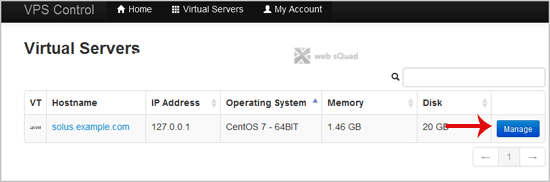
solusvm-select-vps.gif


3. Scroll down, and under the "VNC Password" tab, enter your new password in the VNC text box. Then click on "Change".
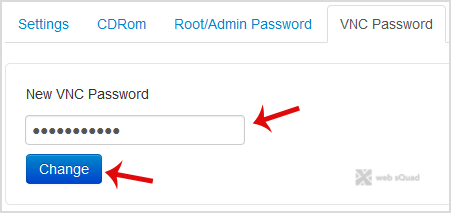
solusvm-vnc-password-change.gif


4. It will prompt for a confirmation. Click "Yes" and then reboot your VPS.



Was this answer helpful?

Related Articles

How to Reboot/Restart Your VPS Using SolusVM? If you want to restart your VPS, you can do it via the Command line or SolusVM.How to... How to Shutdown Your VPS Forcefully or Gracefully Using SolusVM? You can shutdown your VPS in two ways - forcefully or gracefully, using SolusVM. How to... How to Start/ Boot Your VPS Using SolusVM? If your VPS is down/offline, you can start it using SolusVM.1. Login to your SolusVM Control... How to Access Your VPS via VNC in SolusVM? You can access your VPS via VNC in case of emergency such as when your IP is blocked by a... How to Reinstall OS Using SolusVM OS-Reinstaller? You can easily reinstall the operating system using the SolusVM automatic reinstallation tool but...
« Back

  Tag Cloud

website design host privacy Tenda F9 AC1200 AC6 AC9 FreePBX SIP Trunk Asterisk VoIP parked domain MTR Traceroute domain closed redemption transfer delete Internet Usage Bandwidth DP720 DP750 Grandstream FUP Throttle Shape Speed Fibre Internet Fair Usage Policy shopify connect DNS Nintendo Switch Console Port Forwarding expire Web Hosting Legal Terms and Conditions yea link

  Support

My Support Tickets
Announcements
Knowledgebase
Downloads
Network Status
Open Ticket
  • Contact Us
  • Terms of Service

Copyright © 2026 Web sQuad Connect (Pty) Ltd. All Rights Reserved.


Loading...
Loading...
Choose language
العربية
Azerbaijani
Català
中文
Hrvatski
Čeština
Dansk
Nederlands
English
Estonian
Persian
Français
Deutsch
עברית
Magyar
Italiano
Macedonian
Norwegian
Português
Português
Română
Русский
Español
Svenska
Türkçe
Українська

Generate Password

Please enter a number between 8 and 64 for the password length